Generate AAMVA Barcode
🔒 Welcome to AAMVA Barcode Pro
Please use the Login or Sign Up buttons in the header to access your account and generate barcodes.
📰 Latest Posts
Why Choose Our AAMVA Barcode Service?
Simple and powerful service for creating 100% valid PDF417 barcodes for a US Driver's License.
☑️ Validity 100%
We create barcodes in accordance with official AAMVA documentation, so they are exactly the same as the original documents barcodes.
🪙 Best price
We offer the best price on the market. On average, one barcode costs 2 times cheaper than competitors. Take a look at our prices and you will be surprised!
😊 Easy to use
We have been developing our product with a focus on usability and speed of use. User-friendly and responsive UI, random data generators and much more.
How to create barcode?
🚀 How to Create an AAMVA Barcode: Step-by-Step Guide
Welcome to AAMVA Barcode Pro! Creating a highly accurate, AAMVA-compliant PDF417 barcode is very easy. Just follow these simple steps to generate and download your barcode instantly.
🔐 Step 1: Log In and Check Your Credits
First, make sure you are logged into your account.
-
Look at the top right corner of the header. You will see your Login or Sign Up button.
-
Once logged in, check your available credits. Generating 1 barcode requires 1 credit.

📍 Step 2: Select the State
Navigate to the ⚡ Generate page from the main menu.
-
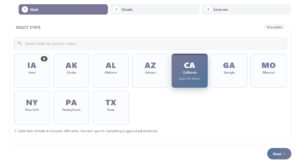
You will see a list of available US states.
-
You can use the Search Bar to quickly find your state by name or abbreviation.
-
Click on the state (e.g., CA, TX, NY) to select it, then click the Next → button.
📝 Step 3: Fill in the Details
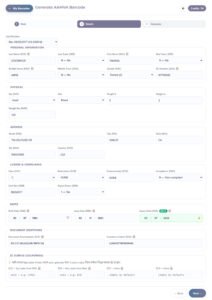
Now, you will see a detailed form specific to the state you selected.
-
Fill in the required information such as Name, DL Number, Address, Dates, etc.
-
Pro Tip: If you want to test the system, click the 🧮 (Dice) button next to the fields to auto-generate random, realistic data!
-
Once the form is filled, click Next →.
⚡ Step 4: Review and Generate
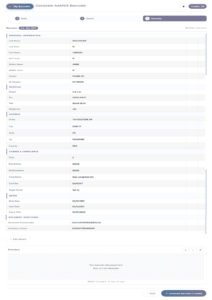
Double-check all the information you have entered in the Review section.
-
If everything looks correct, click the big ⚡ Generate Barcode (1 credit) button.
-
The system will process your data and deduct 1 credit from your account.
📥 Step 5: Download and Save
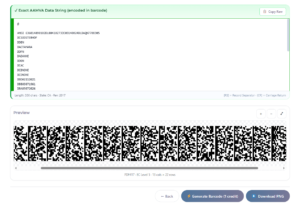
Congratulations! Your barcode is ready.
-
You will see a high-quality PDF417 Barcode Preview on the screen.
-
Below it, you can see the exact AAMVA raw data string.
-
Click the ⬇️ Download PNG button to save the barcode image to your device.
-
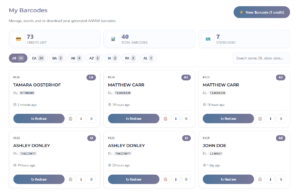
Don't worry if you lose the image—you can always find all your previously generated barcodes in the 📦 My Barcodes section!
What is a MRZ? (Machine-Readable Zone)
Have you ever wondered what those strange, cryptic lines of text at the bottom of a passport or visa are? That is the MRZ.
MRZ (Machine-Readable Zone) is a standardized section found on documents like passports, visas, and some ID cards. It is specifically designed for quick, accurate, and automated machine reading. The MRZ encodes essential information about the document holder, including their name, nationality, date of birth, document number, and expiration date.
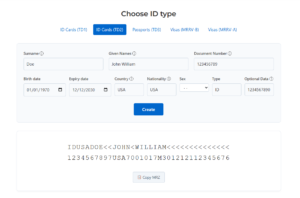
It is typically located at the bottom of the document's information page and consists of two or three lines of text. The text is formatted in a strictly standardized way using letters, numbers, and special filler characters like "<" (e.g., P<USADOE<<JOHN) to ensure that the data can be processed efficiently by optical scanners at border controls, airports, and other checkpoints.
Understanding the Structure (Example: Passport TD3)
In a standard Passport (TD3 format), the MRZ is exactly 88 characters long, split into two lines of 44 characters each. Here is how the data is structured:
-
Line 1: Document Type (e.g., P for Passport), Issuing Country Code (e.g., USA), Surname, and Given Names (separated by <<).
-
Line 2: Passport Number, Check Digit, Nationality, Date of Birth, Check Digit, Sex, Expiry Date, Check Digit, Optional Data, and a final Overall Check Digit.
The "Magic" of Check Digits
You might notice random numbers placed within the text (like the 7 at the end of a document number). These are Check Digits. They are calculated using a specific mathematical formula (the 7-3-1 algorithm).
Why is this important? If a scanner misreads even a single letter or number, the check digit calculation will fail, and the system will immediately know the document data is corrupted or fake. This prevents identity fraud and ensures 100% accuracy at border crossings.
Want to see how it works?
Use our free MRZ Calculator to generate barcodes and calculate check digits instantly with 100% accuracy.
Go to MRZ Calculator: https://mhait.com/mrz/